How to add Arabic captions to a Reel
If you speak Arabic in the video, upload it to Raw2Reel and tap Edit my Reel now: the captions come out in Arabic, right to left, with numbers and English words in place. If you speak English or another language, tap Captions and pick العربية under Caption language, and the captions are translated into Arabic. This guide shows both, with screenshots from the editor.
The short version
Upload the clip
Tap Add a video, pick the clip and tap Edit my Reel now.
Choose Arabic
Spoke Arabic? The captions are already Arabic. Spoke another language? Tap Captions and pick العربية under Caption language.
Check, download, post
Fix any name with a tap, download the video and post it as a Reel.
Step by step, in screenshots
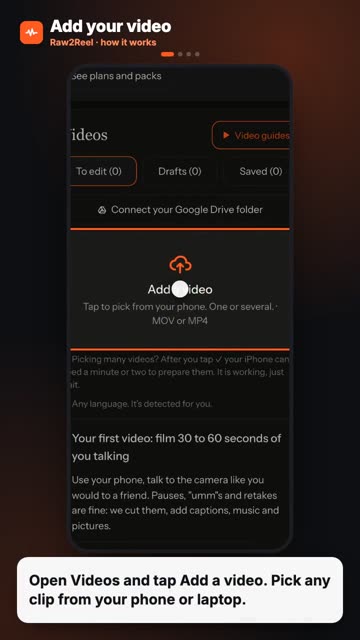
1. Open Videos and tap Add a video. Pick the clip, filmed vertically if you can.
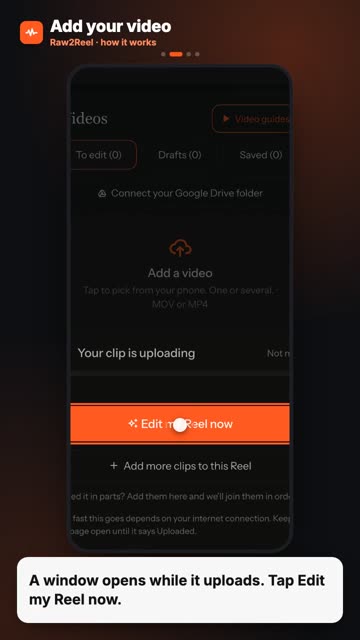
2. Tap Edit my Reel now. The language you speak is recognised by itself, Arabic included.
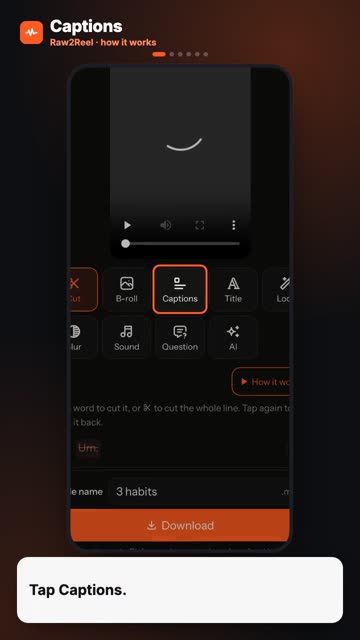
3. Open the video and tap Captions.
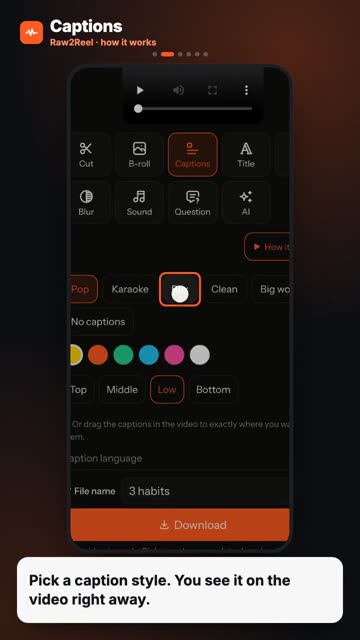
4. Pick a style. Every style works with Arabic; Pop, Karaoke and Big word light up the spoken word.
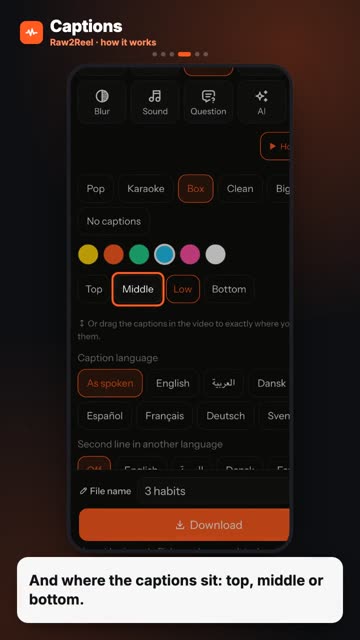
5. Choose where the captions sit. Just below is Caption language: As spoken keeps the language you used, and العربية translates the captions into Arabic. Second line in another language adds a smaller line, for example English under the Arabic.
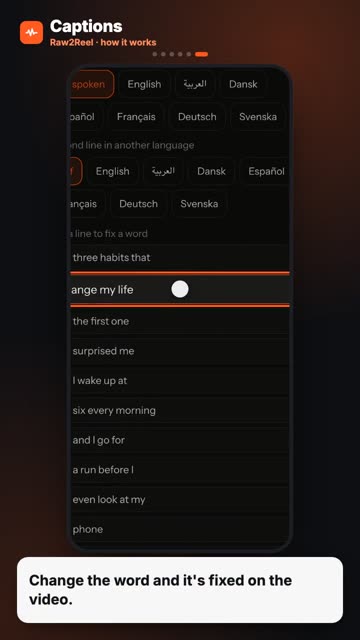
6. Fix a word by tapping its line under Tap a line to fix a word. Names and brands are the usual ones to check.
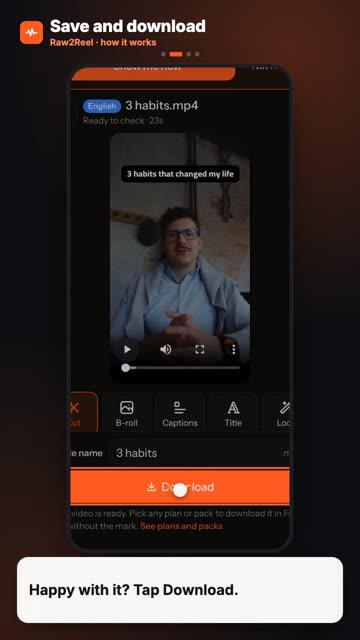
7. Tap Download under the preview to pick a plan or pack. Once the video is made, tap Save to my phone, then Save Video. Open Instagram, tap +, choose Reel and pick it from your Photos.
Why Arabic captions often go wrong
Many apps were built for left-to-right text. Arabic comes out with the words in reverse order, letters that don't join, or numbers and English words jumping to the wrong end of the line. Raw2Reel writes Arabic captions right to left and keeps numbers and English words where they belong in the sentence. If you already have an Arabic subtitle file with this problem, the Arabic subtitle fixer repairs it.
You speak Arabic: dialect or standard
Arabic is recognised by itself, in Modern Standard Arabic and in dialects like Gulf, Egyptian or Levantine, and the captions follow what you said. Dialect words are where recognition is least sure, so read the lines once and fix any word that came out the way you wouldn't write it. Names of people and brands are the other thing to check.
You speak English, your audience reads Arabic
Pick العربية under Caption language and the captions are translated into Arabic. A translation is not the same as a native writer, so for anything important, like an offer, a price or a slogan, ask an Arabic speaker to read it once before you post. If half your audience reads English, add a second line in English under the Arabic.
Where to put them on a Reel
The bottom of a Reel is covered by your name, the first lines of the post text and the audio line, and the buttons run down one side. Put the captions in the Middle or Low, under your chin, and watch the result once on your phone. More on Reels captions and placement.
Burn them in before you post
These captions are part of the video file, so they go on before you upload to Instagram. A Reel that is already posted can't get them afterwards; you would post the captioned file as a new Reel.
What it costs
Watching the full edit with Arabic captions costs nothing and needs no card. To download it, the starter pack is the cheapest way in: 5 videos for $12, paid once. The monthly plan is 15 videos for $15, the yearly plan $120, and packs of 10 for $29 or 30 for $69 have no subscription. Full HD, no mark. All prices.
More you can do with Raw2Reel
Questions
How do I add Arabic captions to a Reel?
Upload the clip to Raw2Reel and tap Edit my Reel now. If you speak Arabic, the captions are already Arabic. If not, tap Captions and pick العربية under Caption language. Then download and post.
Are the Arabic captions written right to left?
Yes, with numbers and English words kept in their right place in the sentence.
Does it understand Arabic dialects?
It recognises Gulf, Egyptian, Levantine and other dialects as well as standard Arabic, and writes what you said. Check dialect words and names once, and fix any with a tap.
Can I translate an English video into Arabic captions?
Yes. Pick العربية under Caption language. For important lines, have an Arabic speaker read the translation before you post.
Can I show Arabic and English captions together?
Yes. Use Second line in another language to add a smaller English line under the Arabic, or the other way round.
Do I need an app?
No. It works in the browser on iPhone and Android, and in Arabic, English or Danish.
Is it free?
Trying it is: you watch the full edit with no card. Downloading needs a plan or pack, starting with 5 videos for $12.