How to add captions to a talking-head video
Upload the clip to Raw2Reel and tap Edit my Reel now: the captions are written from what you say and burned into the video, word by word, with nothing to type or time. Then you pick the style, the colour and the place, and fix any word with a tap. This guide shows every step in screenshots taken from the editor.
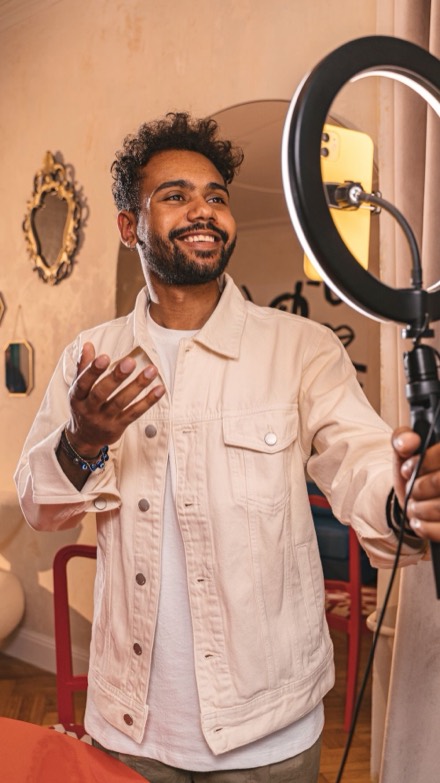
The short version
Upload the clip
Open Videos, tap Add a video, pick the clip and tap Edit my Reel now.
Choose how the captions look
Tap Captions and pick the style, the colour of the spoken word and where the captions sit.
Fix a word and download
Tap a line to correct a name, then download the video in Full HD.
Step by step, in screenshots
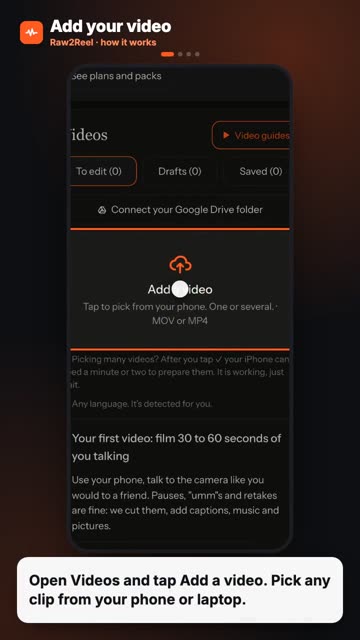
1. Open Videos and tap Add a video. Pick the clip from your phone or computer, exactly as you filmed it.
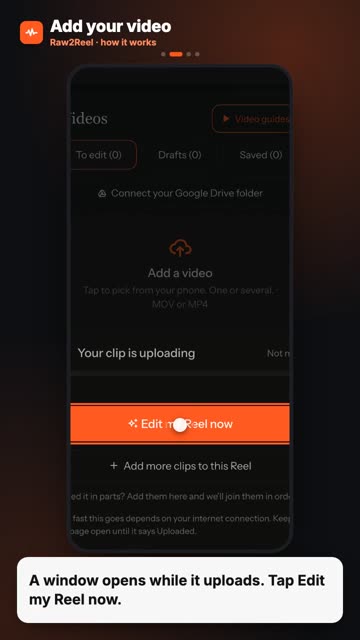
2. A window opens while it uploads. Tap Edit my Reel now. The captions are written while the pauses and retakes are cut.
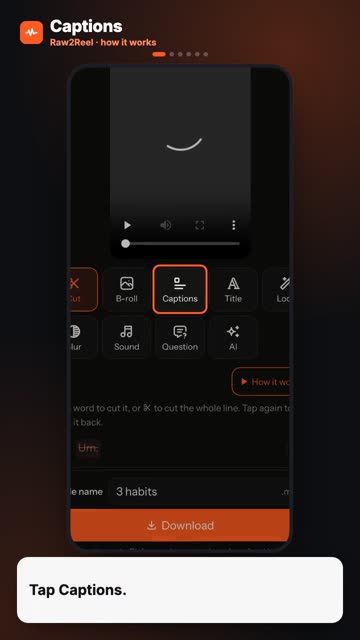
3. When the edit is ready, open the video and tap Captions.
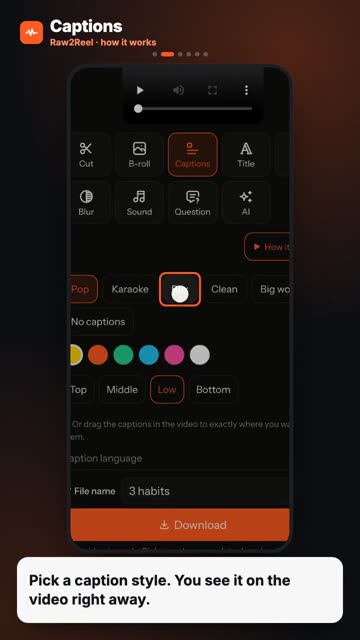
4. Pick a style: Pop, Karaoke, Box, Clean or Big word. You see it on the video right away. No captions switches them off.
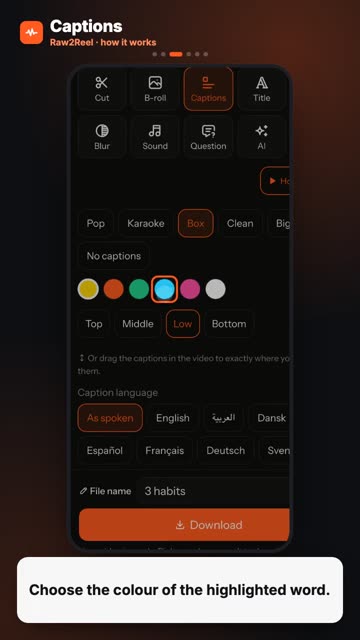
5. Choose the colour of the word being spoken. Pick one that stands out from your clothes and your background.
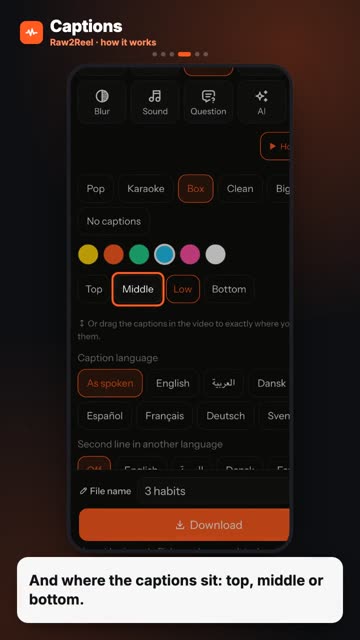
6. Choose where the captions sit: Top, Middle, Low or Bottom. For a face on screen, Middle or Low keeps them under your chin.
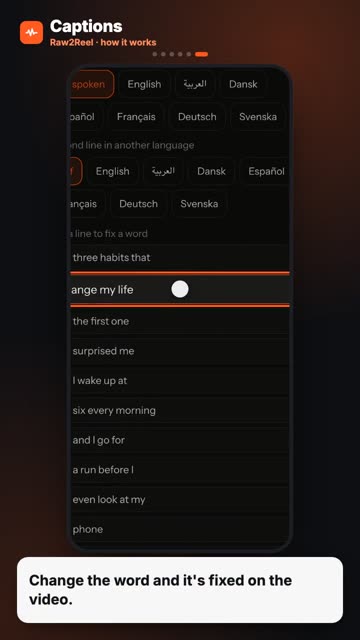
7. To fix a word, tap its line under Tap a line to fix a word and type it right. The video updates by itself.

8. Happy with it? Tap Download under the preview. It opens the plans and packs.
Burned-in captions or a subtitle file?
Burned-in captions are part of the picture, so they look the same for every viewer on Reels, TikTok, Shorts and LinkedIn, and nobody can switch them off. A subtitle file (SRT) sits next to the video and the platform shows it, in its own plain style, only when the viewer turns it on. For short talking videos people watch on mute, burn them in. If you need a file for YouTube or a course platform instead, the subtitle generator makes one from your video.
Which style suits a talking head
Pop shows a few words at a time with the spoken one in your colour, and it suits most talking clips. Karaoke lights up each word as you say it. Big word shows one large word at a time, good for fast, punchy delivery. Box puts each line on a solid block, which helps over a busy background like a street or an office. Clean is quiet and suits calm topics. Pick one and keep it across your videos so people recognise them. More about the styles.
Where to put them when your face is on screen
Captions over your mouth or eyes are the most common mistake. Middle or Low usually lands just under your chin. On Reels and TikTok, the bottom of the screen is covered by your name, the post text and the buttons, so Bottom is the risky choice there. Watch the finished video once on your phone before you post.
Check names before you save
Speech recognition gets ordinary words right almost every time. The usual mistakes are names, brands and product words. Read the transcript lines once and fix those: it takes seconds, and a misspelled brand is what viewers point out in the comments.
Other languages, and two at once
More than 90 spoken languages are recognised by themselves, so you don't pick the language first. The captions can also be translated into 7 languages (Arabic, English, Danish, Spanish, French, German and Swedish), or show a second, smaller line in another language under the first. How to add Arabic captions to a Reel walks through the Arabic case.
Set your look once
If you post often, open My brand and set the caption look for new videos, with your logo if you have one. Every new video then starts in your style, and you only change captions when a video needs it.
How long it takes, measured
In our own test on 17 November 2026, a 30-second clip was edited, captions and all, 43 seconds after the upload. Across real jobs from 6 to 13 November 2026, clips up to 3 minutes reached a finished preview in a median of 33 seconds after pressing Edit. A busy hour can be slower.
What it costs
You can upload, edit and watch the full edit with captions without paying and without a card. To download it, the cheapest way in is the starter pack: 5 videos for $12, paid once. The monthly plan is 15 videos for $15 and you can cancel any time; the yearly plan is $120; packs of 10 for $29 or 30 for $69 have no subscription. All in Full HD with no mark. A video counts only the first time you save it. How downloading works.
More you can do with Raw2Reel
Questions
How do I add captions to a talking-head video automatically?
Upload it to Raw2Reel and tap Edit my Reel now. The captions are written from your speech and burned into the video word by word. Tap Captions to change the style, colour or place.
Do I have to type or time the captions?
No. They are written and timed from what you say. You only fix a word if one is wrong, by tapping its line.
Where should captions go on a talking-head video?
Just under your chin: Middle or Low. On Reels and TikTok, avoid the bottom, which is covered by your name, the post text and the buttons.
Can I turn the captions off?
Yes. Pick No captions in the caption styles. The cuts and the music stay.
Can I get captions in another language?
Yes. They can be translated into Arabic, English, Danish, Spanish, French, German or Swedish, or shown as a second line under the spoken language.
Does it work on my phone?
Yes, in the browser on iPhone and Android, with no app. The video saves to your Photos.
Is it free?
Trying it is: you upload, edit and watch the full edit with no card. To download the video, pick any plan or pack. The starter pack, 5 videos for $12, is the cheapest way in.