How to turn a long video into short clips
Upload the whole recording to Raw2Reel and tap Edit my Reel now. If it is a talking video longer than 3 minutes, like a podcast, a talk or an interview, it comes back as 5 to 10 short clips, best first, each one already edited with the pauses cut and captions on. You watch them, keep the ones you like and download those.

The short version
Upload the full recording
Tap Add a video and pick the recording, or drop it in a connected Google Drive folder.
Tap Edit my Reel now
A talking video over 3 minutes is cut into 5 to 10 short clips, best first.
Keep the best ones
Watch each clip, change what you want, and download the ones you will post.
The first two steps, in screenshots
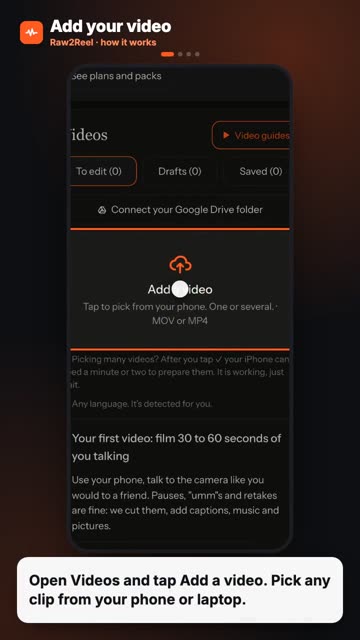
1. Open Videos and tap Add a video, then pick the full recording. You don't trim it first: any length is accepted.
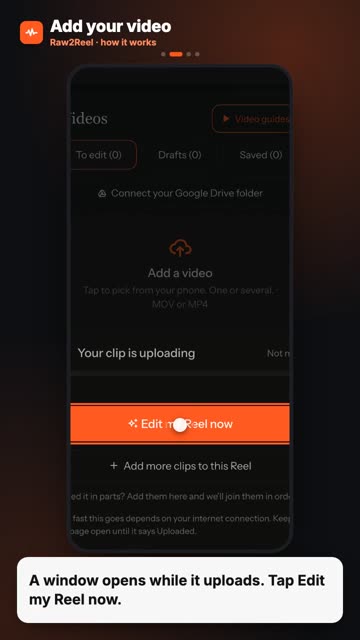
2. Tap Edit my Reel now. For a talking video longer than 3 minutes, Raw2Reel looks for the best moments and makes short clips of them. We don't show the clips list in a screenshot here; it lists the clips best first.
What counts as a long video
Anything mostly talking and longer than 3 minutes: a podcast episode, a talk on stage, a webinar, an interview, a long story to camera. A clip of 3 minutes or less is edited into one finished video as usual.
What you get back
Between 5 and 10 short clips, ranked best first, so the strongest moment is at the top. Each clip gets the full edit: the pauses, ums and repeated takes are cut, word-by-word captions in your style, music and b-roll. You can open any clip and change it by tapping words in the transcript or typing in Ask the AI, for example shorter intro or less music.
Or the whole recording as one video
If you want the full recording edited as one long video instead, you can ask for that too, and your short clips stay where they are.
Getting a big file in
Long recordings are big files. On a phone, keep the page open until the upload is done. If the recording sits on a computer or in the cloud, a connected Google Drive folder is often easier: put the file in the folder and it is picked up by itself.
Picking which clips to post
Best first is a starting point, not a verdict. Watch the top few with sound on, and ask of each one: does it make sense to someone who never saw the rest? Does the first line make you stop? Post the ones that pass, and try the others another week.
What it costs
Watching every clip costs nothing and needs no card. Each clip you download counts as one video, whatever its length, and only the first time you save it. The starter pack gives 5 videos for $12, the monthly plan 15 videos for $15, the yearly plan $120, and packs 10 for $29 or 30 for $69. More about turning long videos into shorts.
More you can do with Raw2Reel
Questions
How do I turn a long video into short clips?
Upload the whole recording to Raw2Reel and tap Edit my Reel now. A talking video longer than 3 minutes comes back as 5 to 10 short clips, best first, each one edited.
How long does my video need to be?
Longer than 3 minutes, and mostly talking. Shorter clips are edited into one video.
How many clips do I get?
Between 5 and 10, ranked best first.
Are the clips edited too?
Yes. Each one has the pauses and retakes cut, captions, music and b-roll, and you can change any of it.
Can I get the full recording as one video as well?
Yes. You can ask for one long video of the whole recording, and your short clips stay.
Does a long clip cost more?
No. A saved video counts as one video whatever its length, and each clip you save counts as one.
Is it free?
Watching all the clips is, with no card. Downloading needs a plan or pack, starting with 5 videos for $12.