How to download your edited video, and what it costs
Uploading, editing and watching your full edit costs nothing and needs no card. To download the video, tap Download under the preview: it opens the plans and packs. The cheapest way in is the starter pack, 5 videos for $12, paid once. After that you save the video in Full HD with no mark, to your phone or computer.

The short version
Tap Download
Under the preview of your finished edit.
Pick a plan or pack
Starter pack 5 videos for $12, monthly 15 videos for $15, yearly $120, or a pack of 10 or 30.
Save it
On a phone, tap Save to my phone, then Save Video. On a computer it downloads by itself.
Step by step, in screenshots
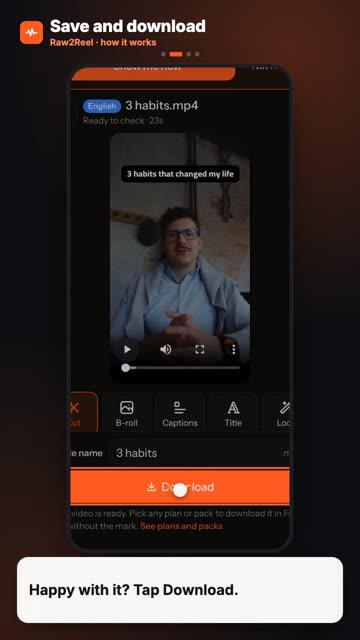
1. Under the preview, tap Download.
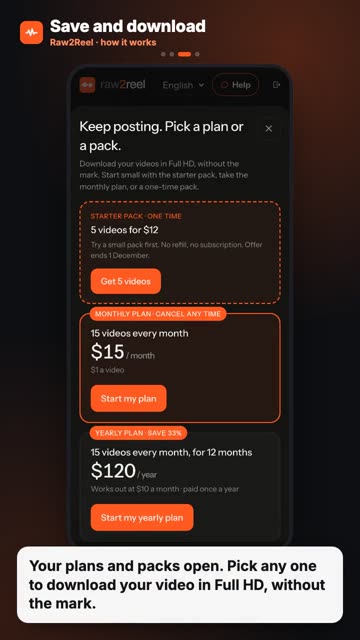
2. The plans and packs open: the starter pack, 5 videos for $12 paid once; the monthly plan, 15 videos every month for $15; the yearly plan, 15 videos a month for 12 months for $120. Packs of 10 and 30 are further down.
What you can do without paying
Upload as many clips as you like, let them be edited, change the cuts, captions and music, and watch every edit in full in the preview. There is no card to enter and no trial that runs out. You pay only when you want the file.
The plans and packs
Starter pack: 5 videos for $12, paid once, no refill and no subscription. It is the cheapest way to try downloading. Monthly plan: 15 videos every month for $15, cancel any time. Yearly plan: 15 videos a month for 12 months, $120 a year, which works out at $10 a month (save 33%). Packs: 10 videos for $29 or 30 videos for $69, paid once with no subscription; a pack refills at the same price when it runs low, and you can stop that by email. In other countries the app shows a local price. Full price table.
When a video counts
A video counts once, the first time you save it. If you change it afterwards and save again, that is free. A long video counts as one video whatever its length; a long recording cut into short clips counts one per clip you save. Clean up sound, which removes background noise, counts as one more video.
What you get
A paid download is Full HD 1080p with no mark. You can save it vertical 9:16 for Reels, TikTok and Shorts, 4:5 for the feed, square 1:1 or landscape 16:9.
Accounts made before 17 November 2026
If you signed up before 17 November 2026, you keep 3 free videos a month, in 720p with a small mark. A plan or pack gives you Full HD with no mark.
Paying
You pay by card through Stripe. If a payment doesn't go through, nothing is charged. Your videos are added as soon as the payment is confirmed.
Before you download
Watch the edit once with sound on, read the captions for names and brands, and check that the captions are clear of your face. Fixing things before the first save is a habit worth having, even though re-saving is free. How to fix captions.
More you can do with Raw2Reel
Questions
How do I download my video from Raw2Reel?
Tap Download under the preview, pick a plan or pack, then tap Save to my phone and Save Video. On a computer the file downloads by itself.
Is Raw2Reel free?
Editing and watching your full edit is, with no card. Downloading needs a plan or pack. The starter pack, 5 videos for $12, is the cheapest way in.
Why does Download open the plans?
Since 17 November 2026, new accounts pay to download. You see the whole edit first, and pay only for the videos you keep.
Do I pay again if I change a video and save it again?
No. A video counts only the first time you save it.
Does a longer video cost more?
No. One saved video counts as one video, whatever its length.
Is there a watermark?
Not on paid downloads: they are Full HD 1080p with no mark.
Can I cancel the monthly plan?
Yes, any time. The starter pack and the packs have no subscription.
I had free videos before. Do I keep them?
Yes. Accounts made before 17 November 2026 keep 3 free videos a month, in 720p with a small mark.