How to remove ums and pauses from a talking-head video
Every talking-head clip has the same problem: the gaps while you think, the ums, and the line you said twice. This guide shows how to cut them in screenshots taken from the editor today, how to undo a cut you didn't want, and how to film so the cuts don't show.

The short version
Upload the clip as filmed
Retakes and all. Tap Add a video, pick the clip and tap Edit my Reel now.
Check the cuts in the transcript
Everything that was cut is red and crossed out. Tap a word to cut it, tap a red word to bring it back.
Save
Tap Download. Captions and music are on too, or switch them off.
Step by step, in screenshots
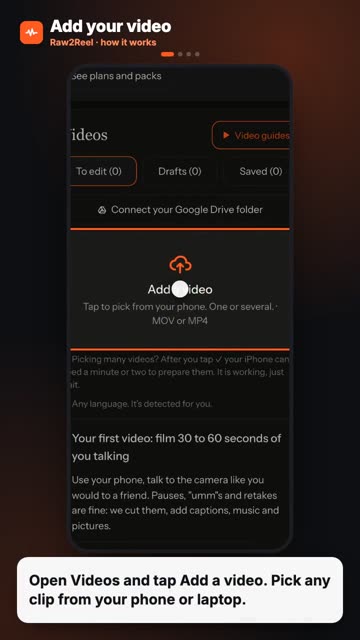
1. Open Videos and tap Add a video. Upload the clip exactly as you filmed it.
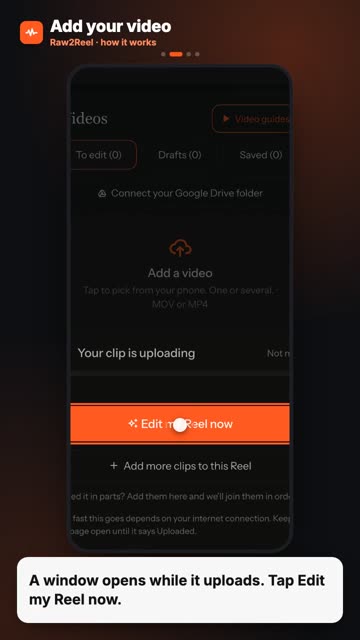
2. Tap Edit my Reel now. The pauses, ums and repeated lines are cut while you wait.
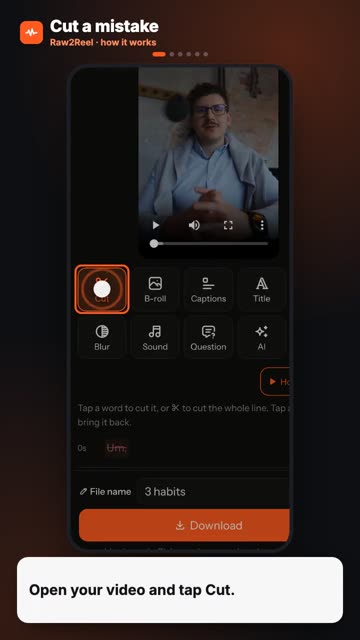
3. Open the video and tap Cut.
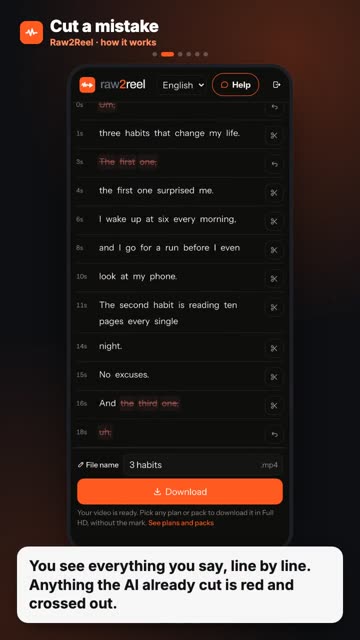
4. You see everything you said, line by line. What was cut (an um, a pause, the first try of a line) is red and crossed out.
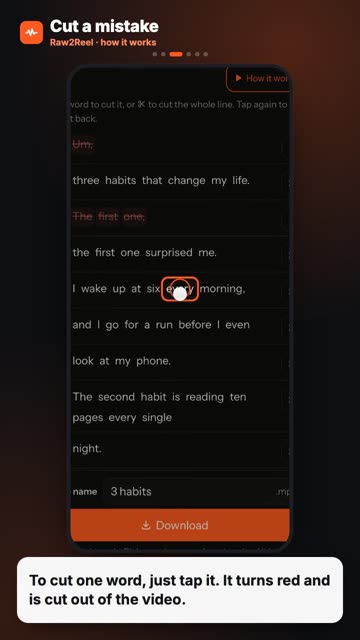
5. Want one more word gone? Tap it. It turns red and is cut out of the video.
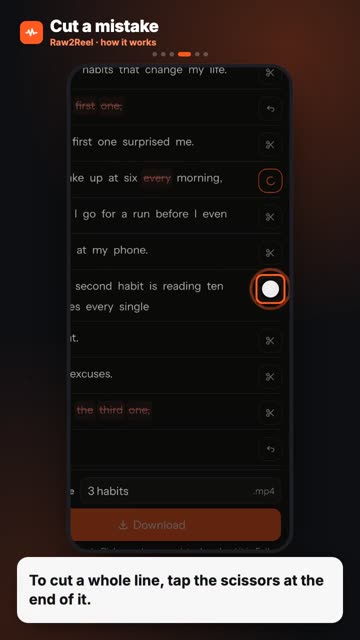
6. To drop a whole sentence, tap the scissors at the end of its line.
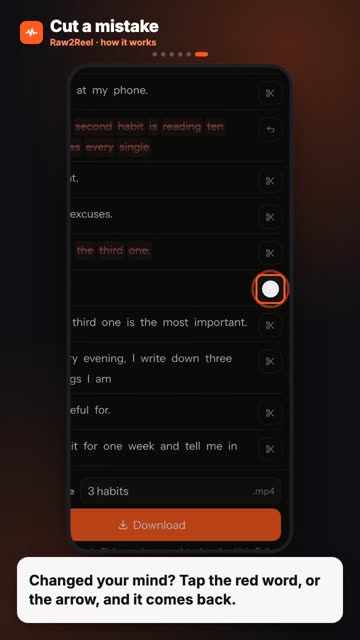
7. Cut too much? Tap the red word, or the arrow, and it comes back. The video updates by itself a moment later.

8. Happy with it? Tap Download under the preview and pick a plan or pack. The final video is made in about half a minute.
Film it so the cuts are clean
Most of a clean cut happens before you edit. When you stumble, stop, wait a second, and start the whole sentence again instead of picking up mid-word: a gap before the retake gives the cut somewhere to land. Keep the phone still and the framing the same, so the two halves of a cut match. A quiet room helps too, because an um surrounded by background noise is harder to separate from the words around it.
Doing it by hand on a timeline
In a timeline editor you play the clip, split it at the start and end of every pause or um, delete the piece, and close the gap. For retakes you find both tries, keep the better one and delete the other. It works and gives full control, but you listen to the whole clip at least twice, and on a one-minute clip with a few retakes it is usually the slowest part of the edit.
Volume-based cutters and transcript-based cutters
Simple silence removers look for quiet audio. They cut the gaps, but they also clip breaths in the middle of a sentence, and they leave a loud um in place because it isn't quiet. A transcript-based editor reads what you said, so it knows an um from a word and the first try of a line from the second. Raw2Reel works from the transcript, which is why its cuts show up as words in red rather than as marks on a waveform.
Hide the jump cuts
Taking pauses out of a single shot leaves small jumps where the cuts meet. On Reels and TikTok people accept them, but they look smoother when the frame changes a little at each cut. Raw2Reel zooms in and out between cuts and adds b-roll over some lines in the same pass. How the rest of a talking-head edit is done.
How long it takes, measured
In the week of 6 to 13 November 2026, clips up to 3 minutes long reached a finished preview in a median of 33 seconds after pressing Edit, and 9 in 10 within 75 seconds. Those numbers come from our own job log, not a chosen test video; a busy hour can be slower. If the recording is longer than 3 minutes, like a podcast, it comes back as 5 to 10 short clips instead, each with the pauses cut.
Watch it once with sound
Before you post, play the result from start to finish with sound on. Listen for a cut that lands mid-word or a sentence that now runs into the next too fast. Either is one tap to fix in the transcript.
What it costs
Watching your full edit is free, with no card. To download it, the monthly plan is 15 videos for $15, or a pack of 10 for $29 or 30 for $69 with no subscription, all in Full HD with no mark. A video only counts when you save it.
More you can do with Raw2Reel
Questions
How do I remove ums from a video automatically?
Upload it to Raw2Reel and tap Edit my Reel now. Ums, pauses and repeated lines are cut for you, shown in red in the transcript, and you can bring any of them back with a tap.
How do I remove pauses from a video without cutting breaths?
Use an editor that works from the transcript instead of the volume. It cuts the gaps between sentences and leaves short breaths inside a sentence alone.
Can I undo a cut?
Yes. Tap the red word, or the arrow at the end of a cut line, and it comes back. The video updates a moment later.
How do I cut a whole sentence I said twice?
Usually it's already cut: the best take stays and the other turns red. If not, tap the scissors at the end of its line.
Does it work for languages other than English?
Yes. More than 90 spoken languages are recognised by themselves, including Arabic, Spanish and Danish.
Do I have to keep the captions and music?
No. Pick No captions in the caption styles, and switch music off with a tap. The cuts stay.
Can I do this on my phone?
Yes, in the browser on iPhone and Android. The saved video goes to your Photos.
Is it free?
Trying it is free with no card: you watch the full edit in the preview. To download the video, pick any plan or pack.